
 Language
Related extensions:
Installing fonts in Linux
The default font manager in Linux operating system is called Fontconfig. Fontconfig is used by various Linux applications to work with installed fonts. Fontconfig stores installed fonts in the /usr/share/fonts folder. Fonts folder contains three subfolders truetype, type1 and X11. You can copy the new font file directly to this folders. If you have truetype font, copy it to the truetype folder. The Adobe Postscript type-1 font and Adobe font metrics file have to be copied into the type1 folder.
Popular Linux desktops Gnome and KDE have installed Font Managers, that can install supported font formats in to the system. You can double click on a supported font file and Gnome or KDE will launch the Font Manager with font preview. After that you can choose Install Font option to install new font to operating system.
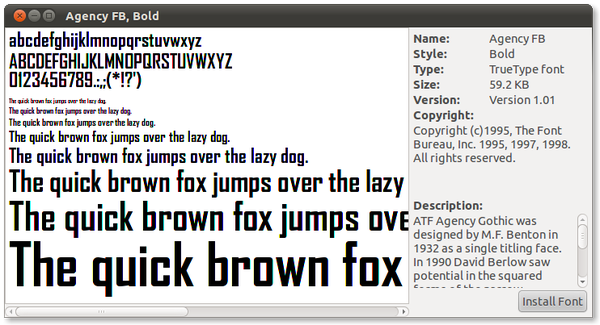
Ubuntu Font Manager screenshot
Supported fonts in Linux
Linux operating system mainly supports TrueType fonts, OpenType fonts and Adobe Postscript type-1 fonts.