Language
Related extensions:
 Virtual Hard Disk (VHD) file format is disk image format originally used in Microsoft Virtual PC for a virtual hard disk on a virtual computer. Virtual Hard Disk contains all parts that can be found on physical hard disk, such as disk partitions, file system, files and directories.
Microsoft later integrated VHD format into Windows operating system. Windows Vista, Windows 7, Windows Server 2008 as well as Windows 8 are able to create and mount .vhd files. Windows Server 2008 and Windows 8 also use .vhd files with Hyper-V virtualization technology.
How to mount VHD virtual hard disk in Microsoft Windows Vista and Windows 7
Microsoft Windows Vista and Windows 7 are able to mount VHD files with Computer Management console. Microsoft Windows 8 also has the VHD mounting option integrated in Windows Explorer.
Mounting of VHD files
-
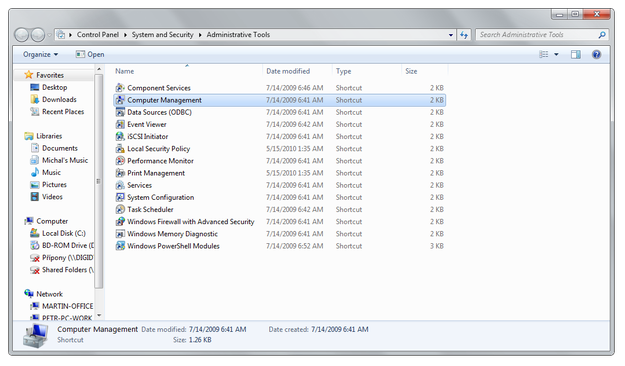
Open the Start menu and go to Control Panel → System and Security → Administrative Tools and double click on Computer Management application.
-
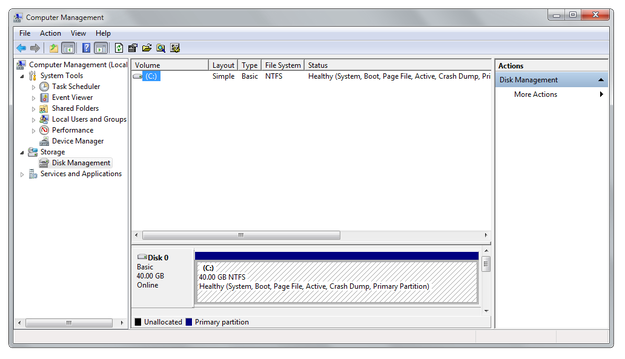
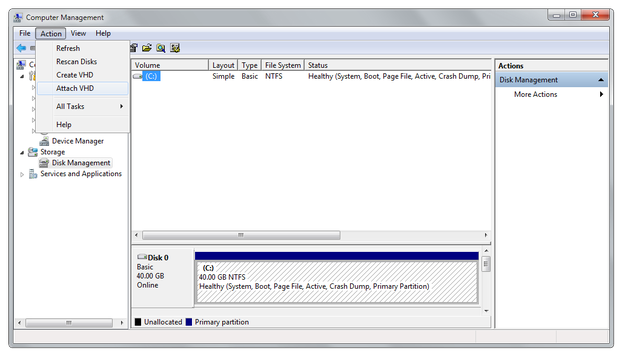
In Computer Management click on Disk Management option.
-
In Computer Management Action menu select Attach VHD option.
-
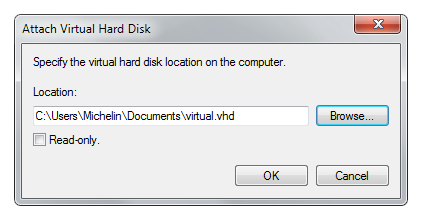
In Attach Virtual Hard Disk window click on Browse... option, select a VHD file, after that click on OK.
-
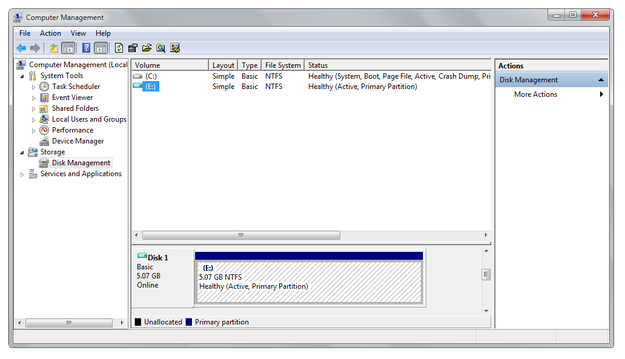
As you can see on the screenshot below, Windows has mounted the Virtual Hard Disk to system and it is able to read or write data on it.