
Files with vm1 file extension can be mainly found as voice data recorded by the voice recorders developed by the Panasonic.
Software that open vm1 file
VM1 file extension - Panasonic voice
What is vm1 file? How to open vm1 files?


The vm1 file extension seems to be mostly associated with the Voice Editing Software and voice recorders, developed by Panasonic.
The vm1 file stores recorded voice in ADPCM 4-bit lossy compression, mono sound format.
This vm1 file type entry was marked as obsolete and no longer supported file format.
This type of file is no longer actively used and is most likely obsolete. This is typically the case for system files in old operating systems, file types from long discontinued software, or previous versions of certain file types (like documents, projects etc.) that were replaced in higher versions of their original programs.
The default software associated to open vm1 file:


Company or developer:
Panasonic Corporation
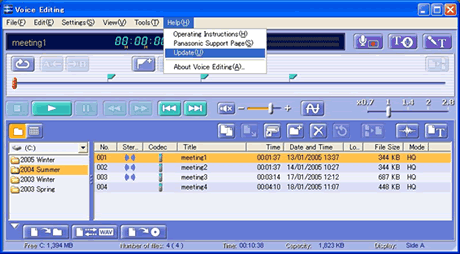
Voice Editing is used to edit audio recorded by by Panasonic digital voice recorders. Need serial number of own voice recorder product to download Panasonic Voice Editing software.
List of software applications associated to the .vm1 file extension
Recommended software programs are sorted by OS platform (Windows, macOS, Linux, iOS, Android etc.)
and possible program actions that can be done with the file: like open vm1 file, edit vm1 file, convert vm1 file, view vm1 file, play vm1 file etc. (if exist software for corresponding action in File-Extensions.org's database).
Hint:
Click on the tab below to simply browse between the application actions, to quickly get a list of recommended software, which is able to perform the specified software action, such as opening, editing or converting vm1 files.
Software that open vm1 file - Panasonic voice
Programs supporting the exension vm1 on the main platforms Windows, Mac, Linux or mobile. Click on the link to get more information about listed programs for open vm1 file action.
Microsoft Windows:
Main software associated with vm1 file by default:
Voice Editing
Other suggested software: Awave Studio


