
Loading...

March 15, 2011 1,104 views

How to burn ISO disk image in Windows

Burn ISO image with Windows Disc Image Burner

About ISO image file

ISO image is an archive file (disk image) of optical disc (CD, DVD, Blu-Ray) using ISO (International Organization for Standardization) format. ISO image is unattached format, that merges series of files into one single file according to a definite format. ISO images typically use .ISO file extension. The name ISO is taken from the ISO 9660 file system used with CD-ROM media.

How to burn ISO

Microsoft Windows 7 is the first version of Windows, that has direct capability of burning ISO disk images to optical media.

  1. Click right mouse button on the ISO image and select Burn disc image option in the popup menu.
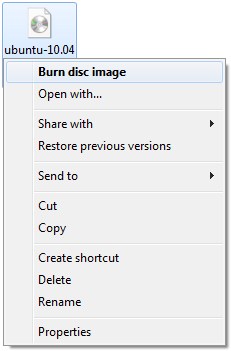
    Microsoft Windows burn option in menu
     

  2. Windows will start the Windows Disc Image Burner.
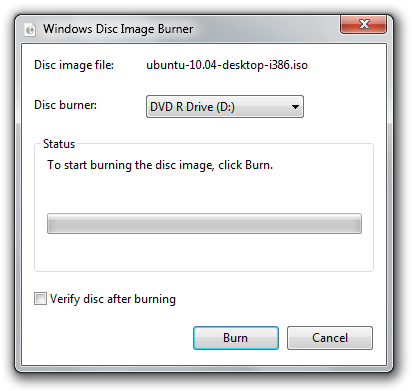
    Windows Disc Image Burner

  3. Insert an optical disk to your disk burner and click on the Burn button to start burning the ISO image.

Related articles

February 21, 2018

Burn ISO to USB drive

ISO format is a popular way for distribution of software, such as operating systems, video games, ba...

Read more
August 4, 2016

Install Windows without DVD or USB

Microsoft Windows system is typically installed on computers with DVD installation media or with USB...

Read more
October 13, 2015

Create ISO's with AnyToISO

Even with the new Windows 10, users are still unable to create ISO images with just the tools from t...

Read more
September 29, 2015

Mounting ISO files in Windows 10

If you are one of the users that upgraded from Windows 7 directly to Windows 10, you may have missed...

Read more
December 3, 2014

Create Windows 8.1 bootable USB installation flash drive

Short tip how to create installation ISO image, or bootable installation USB drive of Windows 8.1 wi...

Read more
March 20, 2014

How to play Sony Playstation games on Mac

Many gaming legends, like Tekken, Soul Blade, Final Fantasy and many more were released only for Son...

Read more