Found 1 record for the .I04 file extension name

Most popular Disk image (ISO) binary file extensions:

daa file icon.daa - PowerISO Direct-Access-Archive file

bin file icon.bin - Binary file

uif file icon.uif - MagicISO Universal Image Format - UIF file

nrg file icon.nrg - Nero-Burning ROM CD or DVD image file

iso file icon.iso - CD/DVD ISO binary image file

mdf file icon.mdf - Alcohol 120% disc image

dmg file icon.dmg - Apple Mac OS X disk image file

mds file icon.mds - Image file (media descriptor file)

file extension I04 - Splited disk image file

File type specification:

Disk image (ISO) binary file file icon|escape Disk image (ISO) binary file type

Extension icon: i04 file icon.I04

File extension I04 description:

It's an ISO mds disk image splitted with DVD Decrypter (to avoid problems with some file systems with large file sizes). You must use the mds file to burn/mount the image or convert it to an iso.
Use sfv file to check integrity of the files to burn (mds file + i00 file (i01 file, i02 file, i03 file, i0[number] etc).

Here are some programs to use mds files with differents O.S. (It's possible do it in different ways)
Windows: DVD decrypter or imgburn, Alcohol 120% etc.
Linux user's: use mdf2iso
Mac users:
Rename the files with extension i00 to i0x as follows:
- filename.i00 => filename.iso.001
...
- filename.i05 => filename.iso.006
Then use the program Split and Concat to join the files and make an ISO.

If you don't know how to burn the files. Use each program's help guide.

.i04

Associated applications to file extension I04:

Alcohol 120%

Alcohol 120%

Company / developer:
  Alcohol Software

Alcohol 120%, is a powerful Windows application that makes it easy to create backups of DVDs* and CDs. In addition, the program lets you store your most used CDs as images on your computer, so you can call them up at the click of a button.

Home users make backup copies of their game CDs and movie DVDs*, allowing the kids to treat multimedia disks roughly, without destroying their value.

Librarians and school administrators use Alcohol 120% to archive their institutions' collections of recordable media, protecting themselves against the daily wear and tear that damages discs.

Business users use Alcohol 120% to make duplicate backup copies of software titles, ensuring that they will continue to have access to their licensed software, even if their physical CDs become damaged and unusable.

With Alcohol 120%, you no longer have to worry about CDs or DVDs* getting lost, stolen, or damaged. Duplicate discs work just like the originals, and your entire collection can be archived safely.


ImgBurn

ImgBurn

Company / developer:
  LIGHTNING UK!

ImgBurn is a lightweight CD / DVD / HD DVD / Blu-ray burning application that everyone should have in their toolkit!

It has several 'Modes', each one for performing a different task:

  • Read - Read a disc to an image file
  • Build - Create an image file from files on your computer or network - or you can write the files directly to a disc
  • Write - Write an image file to a disc
  • Verify - Check a disc is 100% readable. Optionally, you can also have ImgBurn compare it against a given image file to ensure the actual data is correct
  • Discovery - Put your drive / media to the test! Used in combination with DVDInfoPro, you can check the quality of the burns your drive is producing

ImgBurn supports a wide range of image file formats - including BIN, DI, DVD, GI, IMG, ISO, MDS, NRG and PDI.

It supports Unicode folder/file names, so you shouldn't run in to any problems if you're using an international character set.

ImgBurn supports all the Windows OS's - Windows 95, 98, Me, NT, 2000, XP, 2003 and Vista (including all the 64-bit versions). If you use Wine, it should also run on Linux and other x86-based Unixes.

It's a very flexible application with several advanced features that are often lacking in other tools, especially when it comes to burning DVD Video discs. It supports all the latest drives without the need for updates (including booktype / bitsetting / advanced settings on many of the major ones - i.e. BenQ, LiteOn, LG, NEC, Plextor, Samsung, Sony).


DVD Decrypter

DVD Decrypter

Company / developer:
  Freeware

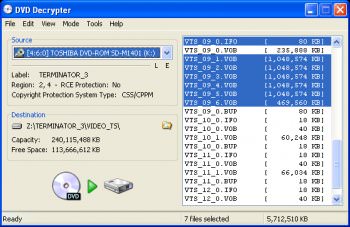
DVD Decrypter is a software application that can create backup disc images of the DVD-Video structure of DVDs. It can be used to image any DVD, but is especially useful for decrypting copy-protected movies. The program can also record images to disc. CSS decrypting software (such as DVD Decrypter, AnyDVD, Smartripper and DVD Shrink) allows a region-specific DVD to be copied as an all-region DVD. It also removes Macrovision, Content Scrambling System (CSS), region codes, and user operation prohibition.


Previous file extension
File extension I03

Next file extension
File extension I05


How to open file with extension I04:

No information how to open I04 available yet. If you know it, please contact us by link above.

How to convert file with extension I04:

No additional information how to convert I04 available yet. If you know it, please contact us by link above.

How to backup file with extension I04:

No additional information how to backup I04 available yet. If you know it, please contact us by link above.

I04

Enter file extension without a dot (eg. rar)