
 Language
Related extensions:
About video on iPad
Apple iPad natively supports video in MP4 video file format. Video files are copied to the iPad via Apple iTunes, that is default managing program for iPad and other devices developed by Apple. iTunes doesn't support video files in other video formats like DivX or XviD. Also it does not have any function to convert other video formats to MP4. There are many third party video converters, that are able to convert video files to a format usable on iPad, but this solution is very time consuming and intended for experienced users.
An effective solution is to use some media player for iPad, that is able to playback other video formats, for example VLC Media Player. VLC Media Player is very popular multiplatform media player with support for many video formats. VLC Media Player for iPad is downloadable from the iTunes Store and source code for developers are available on the VLC Media Player website. Playback of the DivX and XviD movies in VLC Player for iPad is perfect, but MKVs are very slow due to speed limitation of iPad's CPU.
How to import video file to VLC Media Player for iPad
- Download VLC Media Player from the iTunes Store to your iPad.
- Connect iPad to the computer and open the iTunes.
- Select your device and select Apps menu on the top.
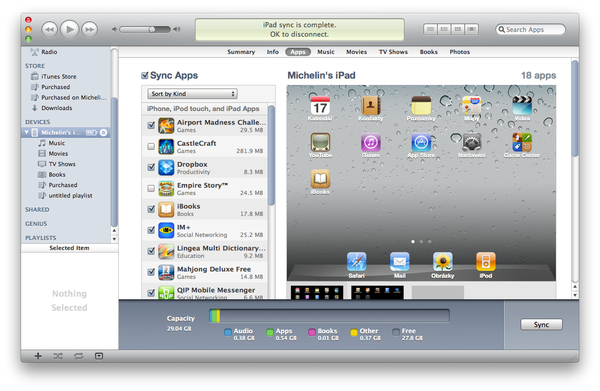
- At the end of the Apps site is File Sharing option with list of applications, that uses this option.
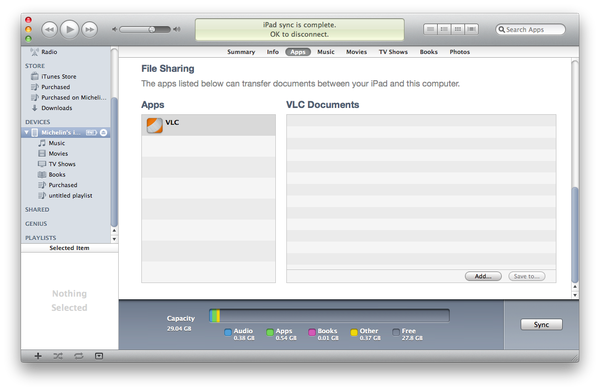
- Click on the VLC in the application list and select Add option.
- Select a video file, that you want to copy in the VLC Media Player in iPad and select the Choose option.
- iTunes will import a video file to the VLC Media Player Library in iPad.
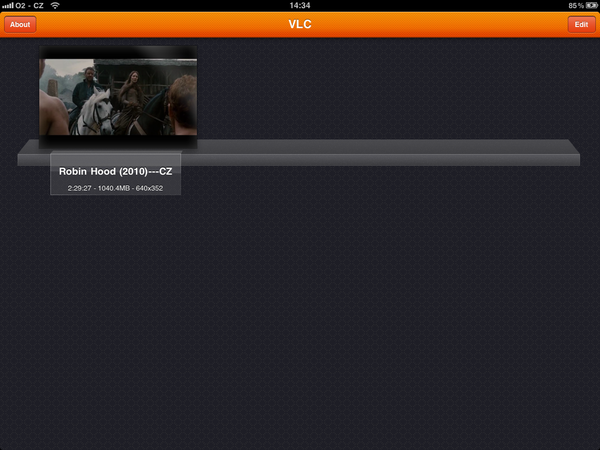
- After that you can tap on the movie in VLC Library in iPad and watch it.
