
 Language
Related extensions:
You have just purchased an AVCHD Camcorder like Sony Handycam HDR-XR100, JVC Everio GZ-MG330, Canon FS10, Sharp VLAH151U Hi8, Panasonic DV PROLINE, or some of the many other available and shot your first AVCHD videos with it, which saved your files in the MTS, MTS2 or TS file format.
AVCHD is the new high definition video format for video cameras. AVCHD stands for Advanced Video Codec, High Definition and is jointly developed by Sony and Panasonic, but JVC and Canon manufacturers are also using AVCHD for their high definition consumer video camcorders.
The AVCHD files are very hard to playback on QuickTime Player or iTunes, and usually you cant can’t just import them to iMovie, Final Cut Pro or some other video editing tool to work with them. Because of that, users need a handy software which can read, edit and convert the AVCHD files. Doremisoft AVCHD converter for Mac is excellent choice for this and in a simple step-by-step tutorial below we will show you, how you can convert your home-made MTS2, MTS or TS files into some other file format, so you can more easily show the HD videos your family, colleagues and friends.
How to easily Convert AVCHD video files on Mac
Step 1: Get yourself AVCHD converter for Mac
Download and Run the free trial version of AVCHD Converter for Mac Software. Once the download is complete, run the file "DoremisoftMacAVCHDConverterTrial3.0.1.dmg" and install the Mac application.
Step 2: Copy the AVCHD files (MTS, MTS2 or TS) from your camcorder in your Mac
Connect the camcoder to your computer with an USB cable and transfer the AVCHD videos, you wish to edit, or convert, to the hard drive.
Step 3: Start the Doremisoft AVCHD Converter for Mac
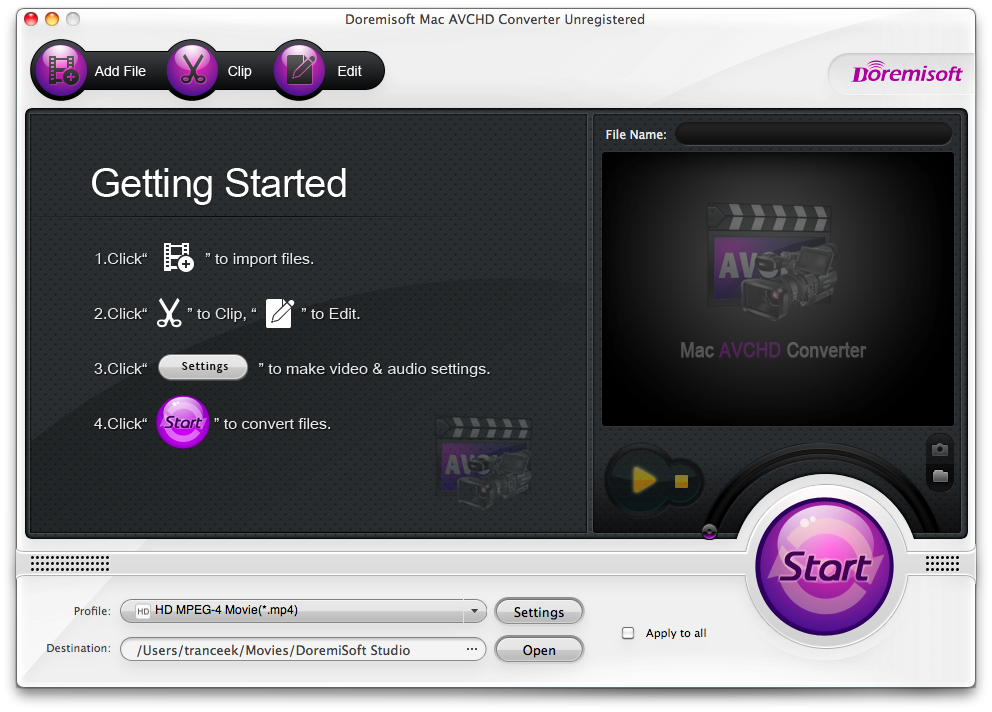
Start the application, then click on Add Files and select the AVCHD files you wish to convert to another format. Doremisoft AVCHD Converter for Mac has an easy-to-use interface, and it will support most popular file formats, including iDVD files. In addition, it includes a batch converter, so you can convert multiple files with one click of a button.
Step 4: Select the video format you want your files to be converted into
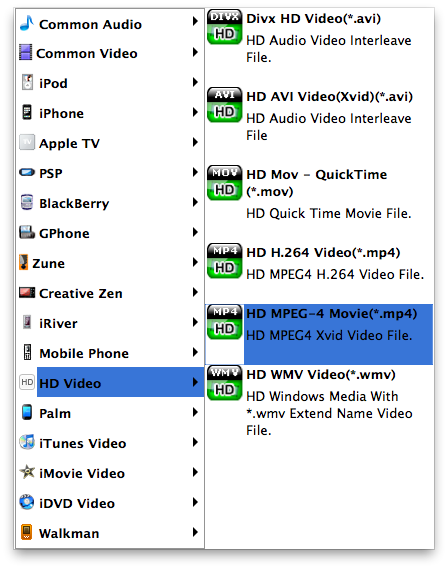
Click on Profile to select the output format for your AVCHD video and using the browse button select the desired location for the converted files. Doremisoft AVCHD converted for Mac is able to convert your video files in multiple video formats including:
- MPEG-4 movie format for editing the AVCHD video in iMovie
- MOV file format for playing the AVCHD movies in QuickTime player
- FLV format for uploading your videos to YouTube and playing with Flash Player
- AVI format for Windows Movie Maker and Windows Media Player
The Doremisoft AVCHD converter for Mac supports also many other formats for various video players and devices as you can see on the screenshot below.
Step: 5 Convert your AVCHD files
Press Start button at the bottom of the application window and convert your AVCHD files into your desired video format. You can check your converted files with the Open button.
You can now copy the converted camcorder AVCHD file to your iPhone, iPod or iPad and enjoy it.
Connect your iPhone to your computer and copy the converted MP4 camcorder video file to your iPhone or other Apple Device, so you can enjoy it on-the-go.
You can also upload your files to YouTube!
In Step 4 of our guide, all you need to do, is to convert your camcorder video (MTS, M2TS, TS, TP, TRP) to FLV format (YouTube video format), then login to YouTube and upload the converted FLV video to YouTube and share it with the World!